Pages

Friday, June 24, 2016

Connect your Bot to the World - XML, JSON, Web Services, HTML Scraping, Twitter, Facebook, Telegram, Email

Bot Libre now supports integrating with XML and JSON web services, HTML scraping, and access to Twitter, Facebook, Telegram, email, and other services. From our scripting languages Self, and AIML you can now access any web service that returns XML or JSON data. You can also scrape information from HTML web pages, and send emails, tweets, Facebook posts, Telegram posts, and more.

Web Services

A web service is an Internet service that provides information on the web. There are countless APIs available on the web that provide every type of service imaginable, such as Google Maps, Twitter, Twilio SMS, and eBay. There also many Internet directories to help you find and use web services such as ProgrammableWeb.

Bot Libre provides web service support through its Self scripting language, and through the AIML scripting language. Bot Libre also provides a script library of common scripts to access many useful web services.

XML Web Services

XML is the parent markup language to HTML. XML defines a text based data format consisting of the data's attributes, elements, and text data. To call an XML webservice you use a web URL with either a GET request, or a POST request.

Bot Libre supports both GET and POST request with Self, and supports GET requests with AIML.

XML GET Example

This example uses the GeoNames web service from GeoNames.org. Geonames can return place names and other geographic information, given a postal code, or other geographic information.

You can apply the same pattern to access many other XML web services.

URL

XML Result

Self Example

You can access web services from Self using a Template object in a response, or from a script. The Http class is used calling the requestXML method and passing the URL, and an optional XPath expression that extract the desired data from the XML document.

XPath is a standard navigation query syntax to access or extract data from an XML document. If an XPath is not given, the call will automatically convert the XML data to a Self object. You can access the object's data using the standard JavaScript dot notation. It is much more efficient to use an XPath, so the entire XML document does not need to be converted and persisted as a Self object.

This example is also available in our script library here

AIML Example

You can access a web service from AIML using the SRAIX tag. SRAIX is an AIML tag used to call other services, or other bots. SRAIX has several attributes, the service must be set to XML to access an XML service, and the URL is given as the SRAIX body. An XPath expression must be provided to the call to extract the desired text data from the XML document.

This example is also available in our script library here

XML POST Example

An XML POST request sends, and receives XML data. Many web services use POST requests so the application can provide data to the call.

This example will actually call the Bot Libre web API using a POST request. This is somewhat unusual, as the bot is already on Bot Libre, but this lets one bot talk to another bot. Be careful doing this, as you do not want bots to get into loops or cycles. You can use this same pattern to call any other web service that takes and returns XML data, even call bots on other servers or APIs. Bot Libre also provides the sraix AIML tag and the request() Self API to allow bots to talk to other bots on Bot Libre or other services such as PandoraBots, and PersonalityForge.

Self Example

This example uses a Self state to forward a question to Brain Bot when the user says "ask Brain Bot".

This example is also available in our script library here

JSON Web Services

JSON is the standard text base object format for JavaScript. JSON can be used to convert any JavaScript object to text, and included attributes, nested objects, and arrays. To call a JSON webservice you use a web URL with either a GET request, or a POST request.

Bot Libre supports both GET and POST request with Self, and supports GET requests with AIML.

JSON GET Example

This example uses the GeoNames web service from GeoNames.org. Geonames can return place names and other geographic information, given a postal code, or other geographic information.

You can apply the same pattern to access many other JSON web services.

URL

JSON Result

Self Example

You can access web services from Self using a Template object in a response, or from a script. The Http class is used calling the requestJSON method and passing the URL, and an optional attribute that extract the desired data from the JSON document.

This example is also available in our script library here

AIML Example

You can access a web service from AIML using the SRAIX tag. SRAIX is an AIML tag used to call other services, or other bots. SRAIX has several attributes, the service must be set to JSON to access a JSON service, and the URL is given as the SRAIX body. A object attribute must be provided to the call to extract the desired text data from the JSON document.

Only basic JSON web services can be called with AIML, as AIML is texted based, not object based. Only direct attributes can be accessed. Since our GeoNames examples returns complex data, an AIML example is not possible.

HTML Scraping

HTML is the markup language used in all websites on the Internet. You can access data from an HTML page using the URL for the page, and an XPath expression to extract the data. Refer to the XML example for a description of XPath.

Bot Libre supports HTML scraping with Self, and AIML.

HTML Example

You can access HTML data from Self using a Template object in a response, or from a script. The Http class is used calling the requestHTML method and passing the URL, and an XPath expression that extracts the desired data from the HTML document.

This example is also available in our script library here

AIML HTML Example

You can access a web service from AIML using the SRAIX tag. SRAIX is an AIML tag used to call other services, or other bots. SRAIX has several attributes, the service must be set to HTML to access an XML service, and the URL is given as the SRAIX body. An XPath expression must be provided to the call to extract the desired text data from the XML document.

This example is also available in our script library here

Facebook, Twitter, Telegram, Email, SMS, RSS

Bot Libre provides several other classes in Self for accessing other services, such as Facebook, Twitter, Telegram, SMS, email, RSS feed, and more.

For example, if your bot is connected to a Twitter account, you can have the bot send a tweet using:

Twitter.tweet("hello world");

This can be used to forward posts from one service to another, or escalate a chat session to email, or notify a human agent using SMS. There lots of examples scripts, here.

When you can connect your bot to the whole world, the possibilities are endless. We can't wait to see what you will build.
Friday, June 17, 2016

How to add a virtual agent to your website

A virtual agent is a term typically used to describe a type of chat bot used for business.

A virtual agent could be a virtual sales agent, a virtual customer service agent, or another type of virtual agent. A virtual agent is an automated version of a human customer service agent.

There are many virtual agents on the Internet, on websites and on social media. They offer help with websites, give information about their companies products or services, answer users questions, provide support, sales, and customer service.

Bot Libre makes it easy for you to create your own chat bot, or virtual agent.

You can create your own bot, and embed it on your own website, or mobile app. You can create bots for website help, technical support, sales, marketing, customer service, or to automate social media.

Bot Libre bots require no programming, and can be trained easily using several methods. Bots can be trained by importing FAQ's, scripts, and chat logs, reviewing and editing responses from our Admin Console's Training & Chat Logs page, or through conversations with you and other people, or from listening in on live chat.

Bot Libre bots supports advanced artificial intelligence that can be enabled to let bots learn and comprehend language. Bots can also be scripted and programmed using AIML, and the Self (a dialect of JavaScript).

To create your own bot follow the steps in the how to How to create your own chat bot in 10 clicks

Once you have created your bot, you can 'Edit' it to change any of its information. You can change your bot's picture or choose an animated avatar from the Avatars page in its Admin Console. You can also connect your bot to Twitter, Facebook, or email, or have it join an IRC chat room. You can import chat logs, or words from Wiktionary, or data from WikiData. You can browse the internal structure of your bots memory. If your are an advanced user, you can program or script your bot using AIML or Self. You can view your bot's log.

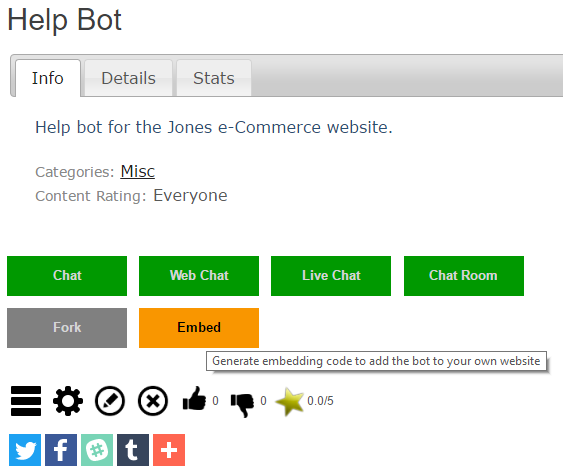
To link to your bot you can select it and copy its URL from your browser, this is its unique URL. You can also embed your bot on your website or blog, you can learn how from the Embed page. To get to your bot's Embed page click on its Embed button.


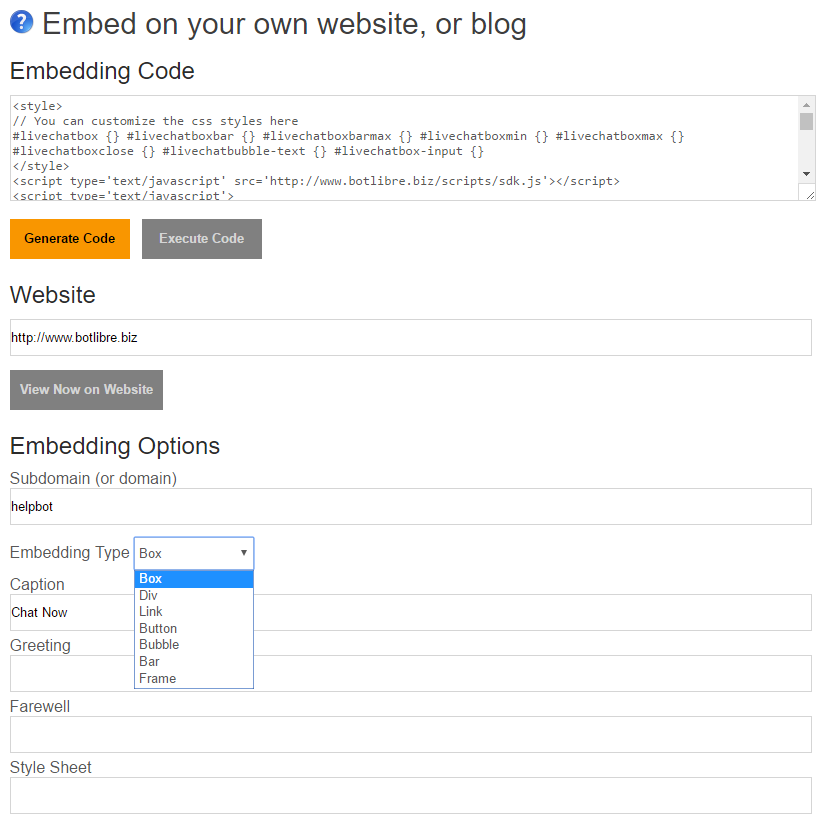
The Embed page generates the HTML/JavaScript code required to embed your bot on your own website. Simply copy the code in the top text area, and paste it into the page on your website you want the bot to appear on.

The Embed page provides several different types of embedding, and many embedding options to control the look of the bot on your page. The "Box" embedding option is the most common for a virtual agent, and gives you a "Chat Now" button on your page.

The embed page also lets you enter a CSS styles sheet to customize the look and feel of your bot's popup. You can also customize the style settings in the generated code.

The embedding code uses JavaScript, and the open source Bot Libre JavaScript SDK. You can customize the JavaScript however you wish. There are also more embedding options available in the JavaScript object, such as prompting the user for their contact information.


Once you add the code to you website, you will get a "Chat Now" button on your website. When users click the button your virtual agent will popup in-page offering its help.


If you also want to add live chat to your website, you can do that by creating a Live Chat Channel, and getting its embed code from its embed page.

That's it, good luck creating your bots. If you have any questions you can contact support@botlibre.com, or chat with the Help Bot

Tuesday, June 14, 2016

How To Connect your Bot to SMS Text Messaging

Through Bot Libre, you can now send and receive SMS messages with your own bot. You can use this to chat with your bot through SMS, but the possibilities are endless. You could also use it to perform surveys or marketing, send customer service escalations, or send notifications from social media or email. Any bot can be set up with SMS text messaging with an account on Twilio.com. This "How To" will give you a step by step process to connect your bot with Twilio to allow for SMS text messaging.

Step 1 - Create a Bot 

First you must create a bot that you want to connect to SMS Text Messaging, or you can use one of your existing bots. To create a bot, follow the instructions here: How to create your own chat bot in 10 clicks

Step 2 - Create a Twilio account

Click here to go the Twilio website. To create a trial account, click on the "+ Sign Up" link in the top right corner of the website.

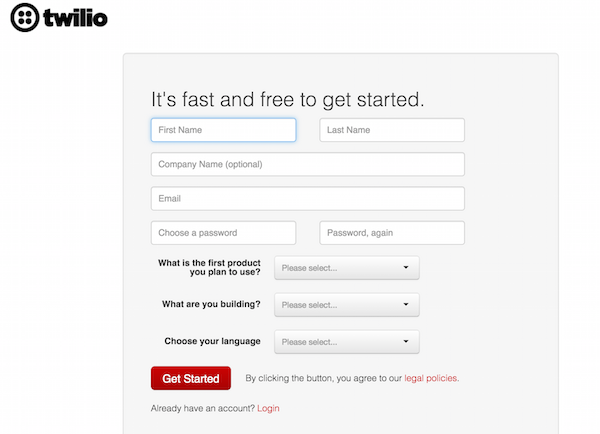
Enter your information on the following form, then click the "Get Started" button.

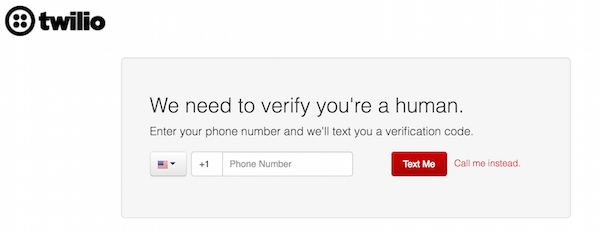
You will then need to enter a phone number to receive a verification code.

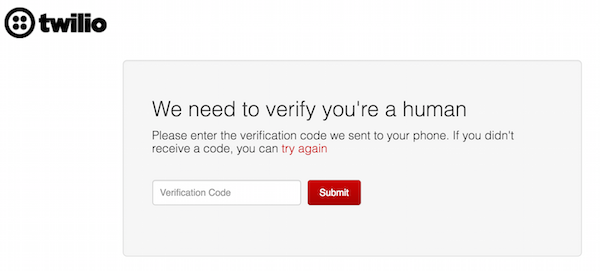
Once you have received your verification code, enter it on the following screen and press "Submit" to complete your account creation.

Step 3 - Get a phone number from Twilio

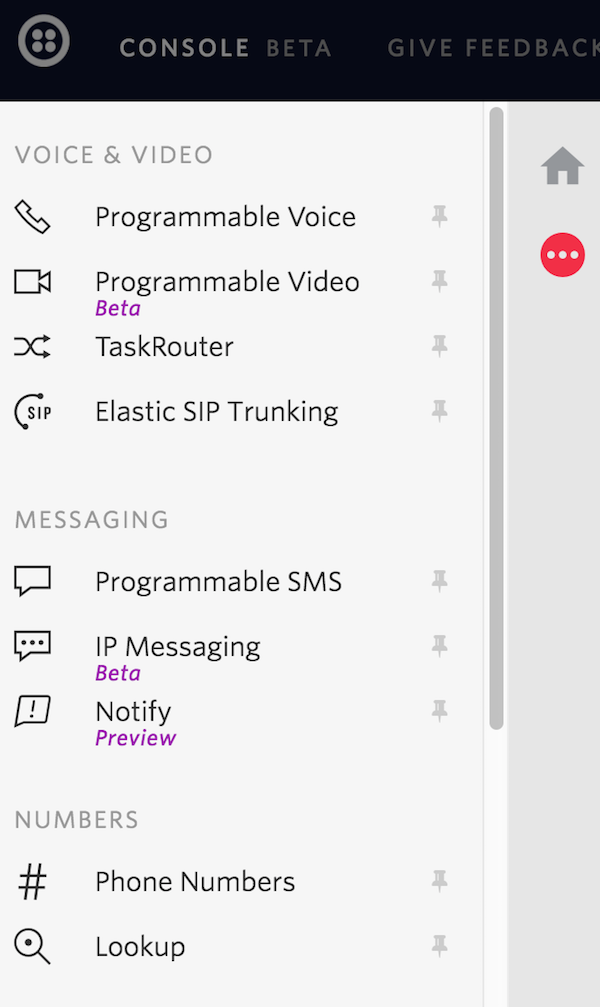
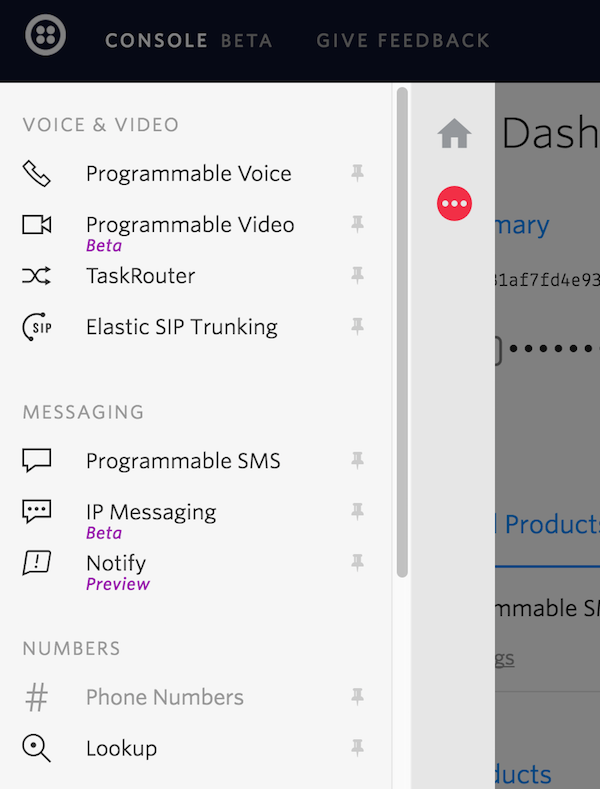
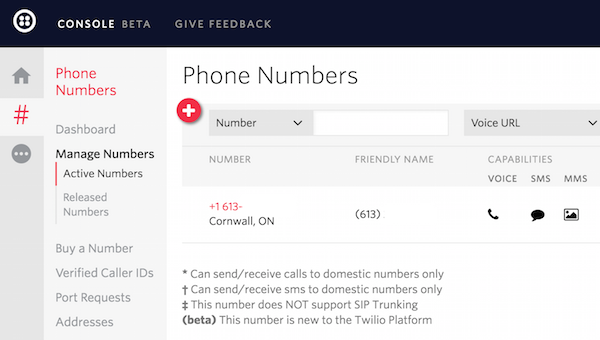
From the menu on the left side of the Twilio website, select "Phone Numbers"


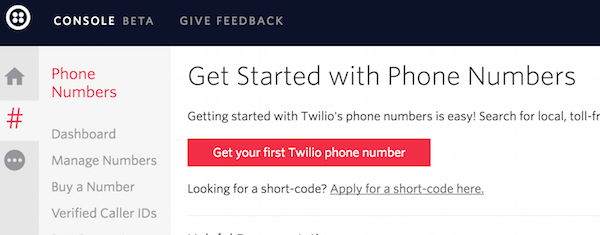
Click the "Get Started" button to begin. Next, click the "Get your first Twilio phone number".

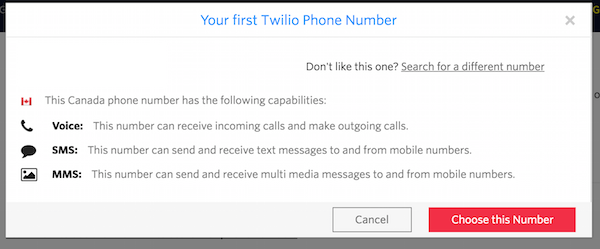
A screen will pop up with a phone number that has been chosen for you. You can accept this phone number by clicking the "Choose this Number" button. If you want to try again for a different phone number, you can click the underlined "Search for a different number" link. Ensure the number you select has SMS capabilities.

Step 4 - Connect webhook

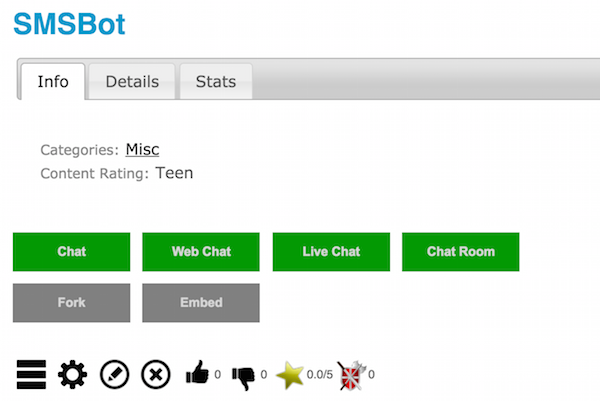
Navigate to your bot's page on the Bot Libre website. Go to its admin console by clicking on the gear icon.

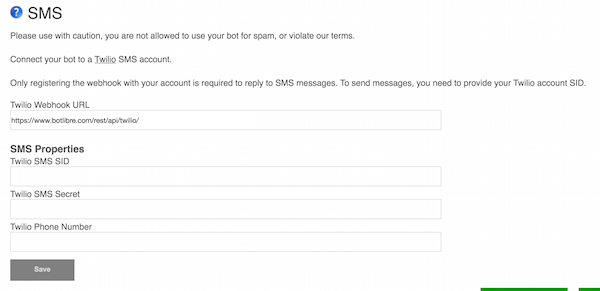
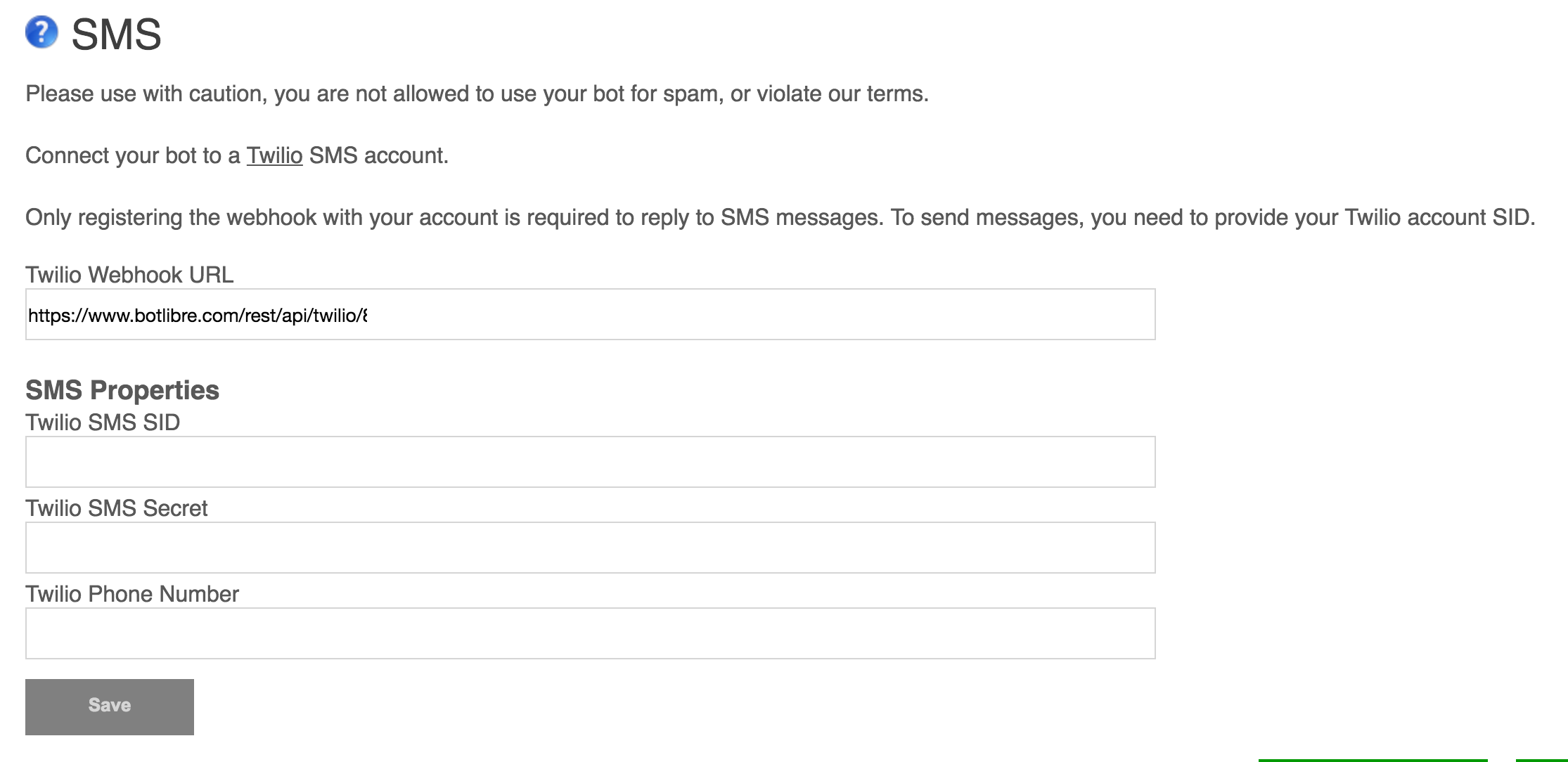
Click the "SMS" link to view your bot's SMS settings. Copy the "Twilio Webhook URL" to your clipboard.

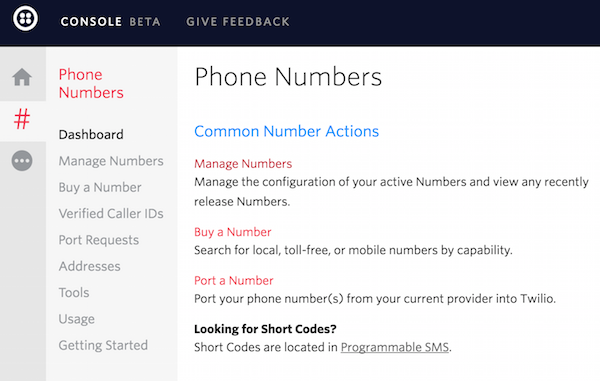
Now return to the Console on the Twilio website and select "Phone Numbers"

Next, select "Manage Numbers"

Select the phone number you created to edit its settings.

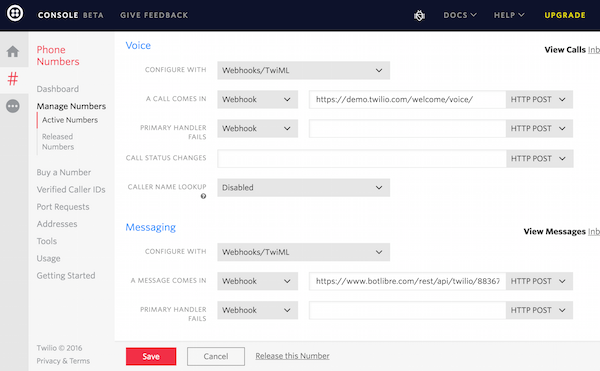
Scroll down to the "Messaging" section and select "Webhooks/TwiML" from the "Configure with" dropdown menu. Paste the Webhook URL from your bot's SMS admin page into the "A message comes in" Webhook field.
Your bot should now be able to reply to SMS messages sent to the phone number you set up on Twilio. Trial accounts on Trilio can only send messages to phone numbers you have verified in the phone numbers section of your account portal. To remove this restriction, you will need to upgrade your Twilio account.

Step 5 - Accessing SMS from a script

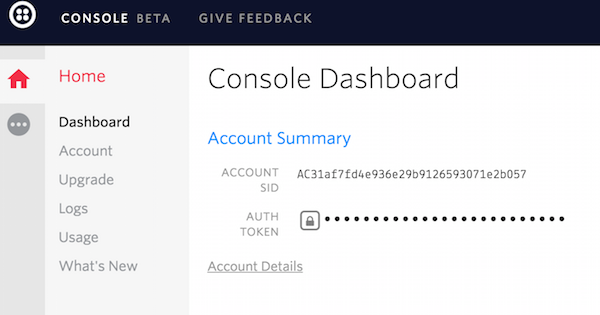
 To send SMS message's from a bot's script, you will need to enter your Twilio account's SID, Auth Token and phone number into your bot's SMS admin page. You can find your Twilio Account SID and Auth Token on your Account Dashboard on the Twilio site.

Return to your bot's SMS admin page and enter your Account SID into the Twilio SMS SID field, the Auth Token into the Twilio SMS Secret field and your Twilio phone number into the Twilio Phone Number field. Press "Save"

You will now be able to send SMS messages from your bot through scripts. The method for sending an SMS message from a Self script is Twilio.sms("+16131234567", message); The first parameter is the phone number the SMS message will be sent to. The second parameter is the message that will be sent to the number. For an example of how to do this, please look at the source for this script: https://www.botlibre.com/script?id=12864737


In summary, your bot should now be able to send and receive SMS messages. By creating a Self script, you will be able to create custom behaviour for sending SMS messages in response to chat messages sent to your bot. If you encountered any issues, or would like help setting up your bot please email us at support@botlibre.com or upgrade to our Platinum service and we can build your bot for you.

Saturday, May 14, 2016

How To Connect a Bot to Facebook Messenger

Keeping up with social media and keeping your online community engaged can be a time consuming task. Through Bot Libre you can now automate your Facebook presence with your own Facebook Messenger bot. Any Bot Libre bot can be connected to a Facebook Messenger page account. The bot will reply to your users questions in real-time using the responses of script you have trained your bot with.

Connecting a bot to Facebook is a bit of a process, as Facebook requires a lot of permissions and validation to be setup to allow a bot on their platform. This "how to" give you a step by step process to connecting your bot to Facebook Messenger.

Step 1 - Create a Facebook Page for your bot.

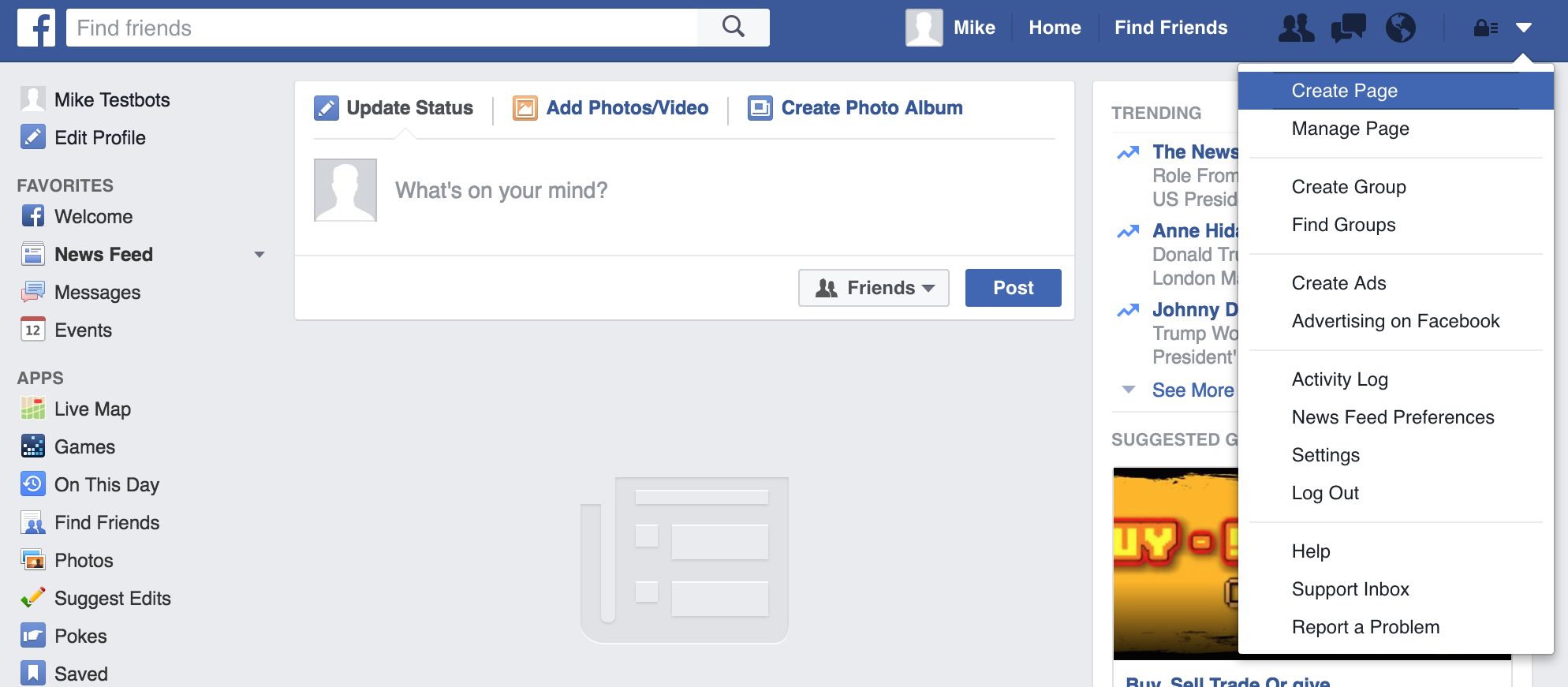
After you have logged in to your Facebook account, you can create a page by clicking on the menu at the top-right of the page and clicking “Create Page”.

You must then select a category for your page. Choose a category that will make sense for your bot.

Fill out the details for your page to finish creating it.

Step 2 - Create a Facebook App for your bot.

Go to http://developers.facebook.com and click on the Register button. Accept the Facebook Platform Policy and Facebook Privacy Policy to continue.

You will need to verify your account by adding a phone number and entering a confirmation code sent to you by text message or phone call. You may also verify your account by adding a credit card.

On the following screen, select the "basic setup" option at the bottom.

Next, you will have to enter a Display Name, Contact Email and Category for your app.

After you have entered the required details, click the "Create App ID" button. This will take you to the following screen.

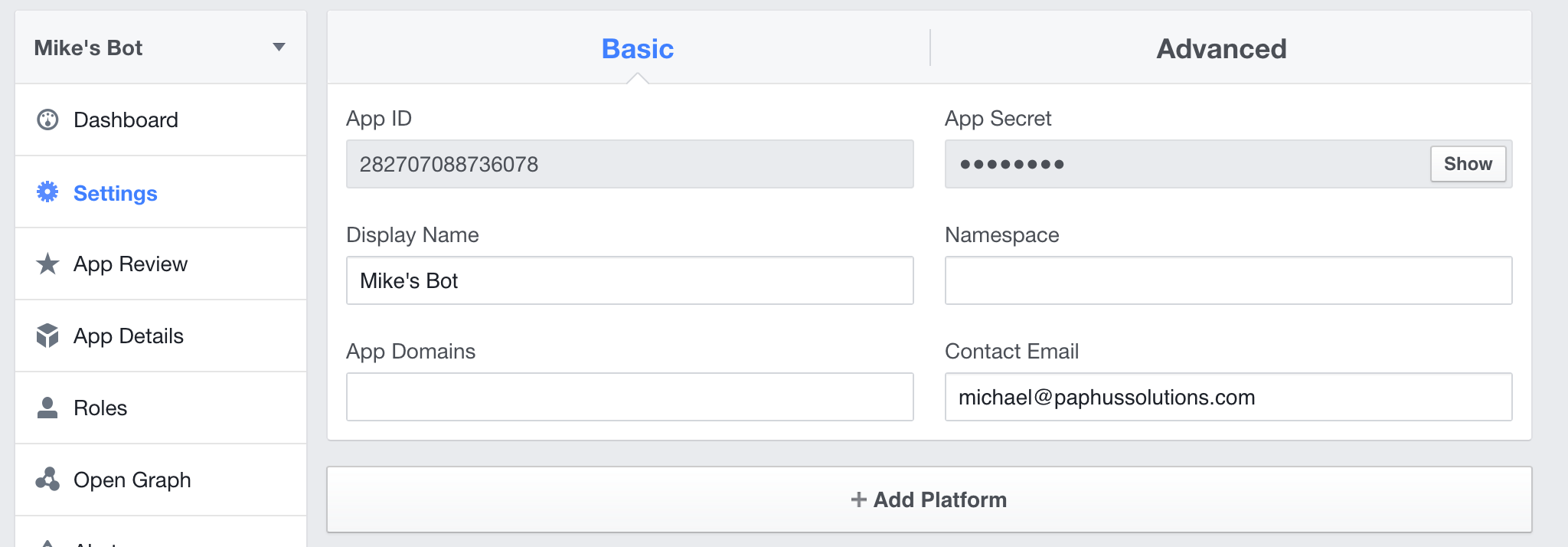
Note your App ID and App Secret, you will need these in following steps.

Click on the "Settings" tab on the left hand side of the screen underneath "Dashboard" to bring you to the following screen.

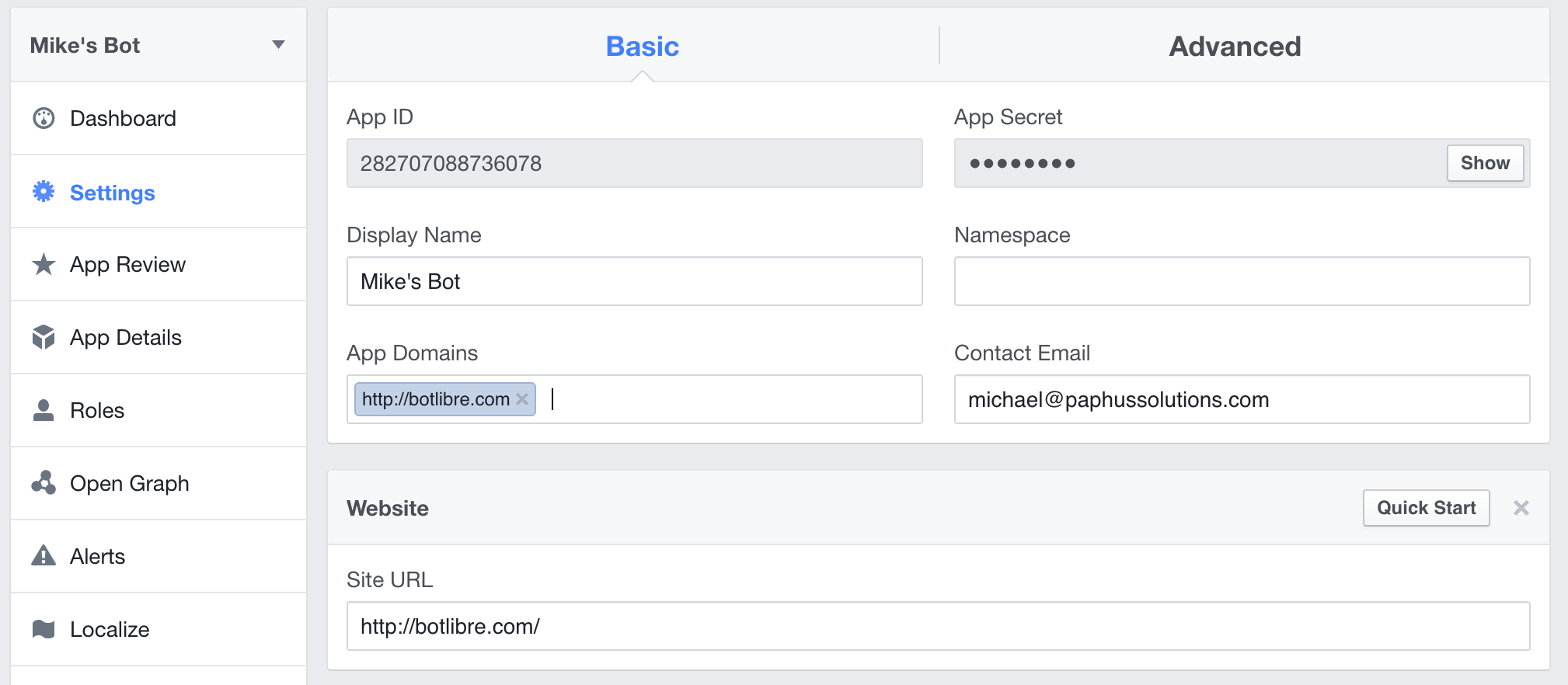
Click the "+ Add Platform" button at the bottom and select "Website". Fill in the Site URL with "http://botlibre.com", then add "http://botlibre.com" to App Domains as follows.

Step 3 - Create a bot

Next, you will need to create a bot to connect with your Facebook Page and App. You can follow the instructions here to create your bot: How to create your own chat bot in 10 clicks

Step 4 - Connect bot with Facebook

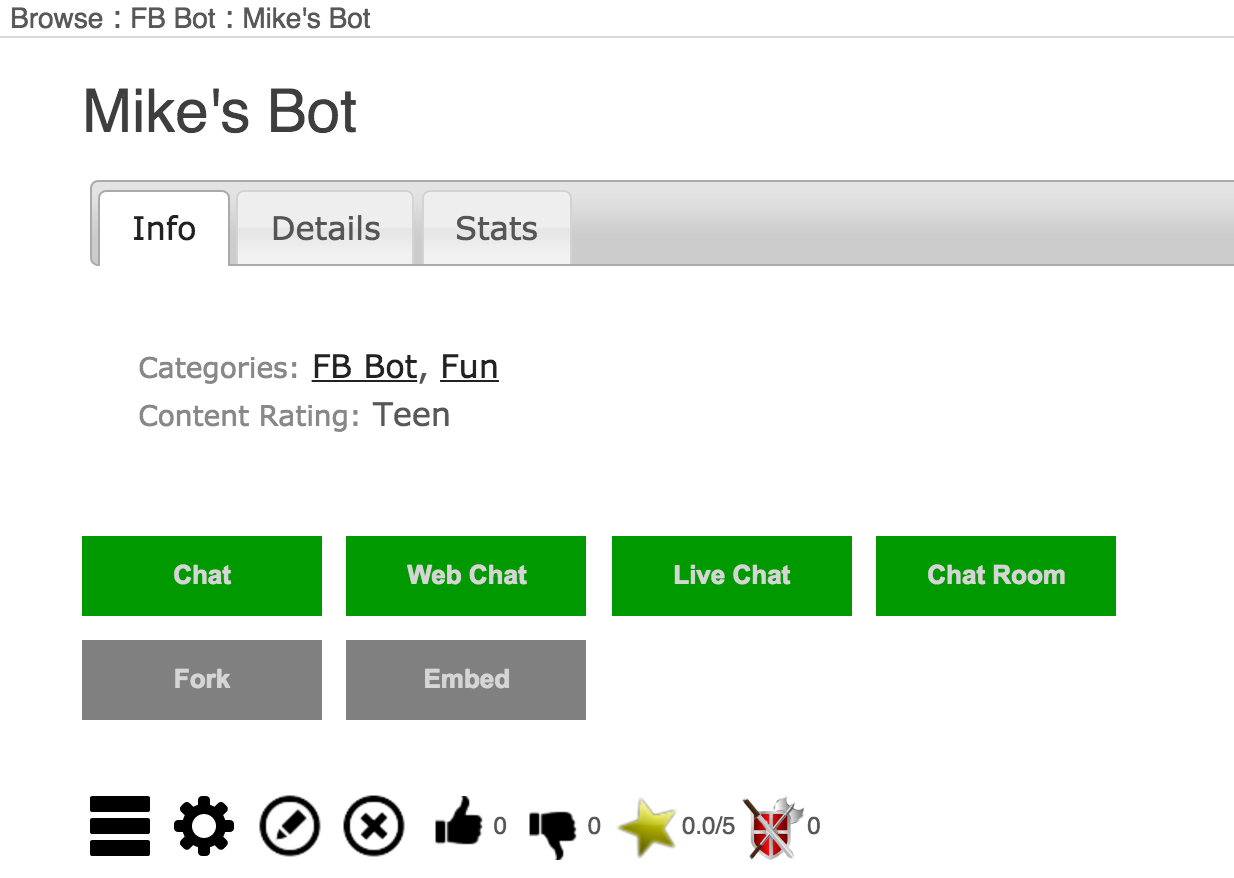
From the Bot Libre website, browse to your bot. Go to the Admin Console by clicking on the gear icon at the bottom.

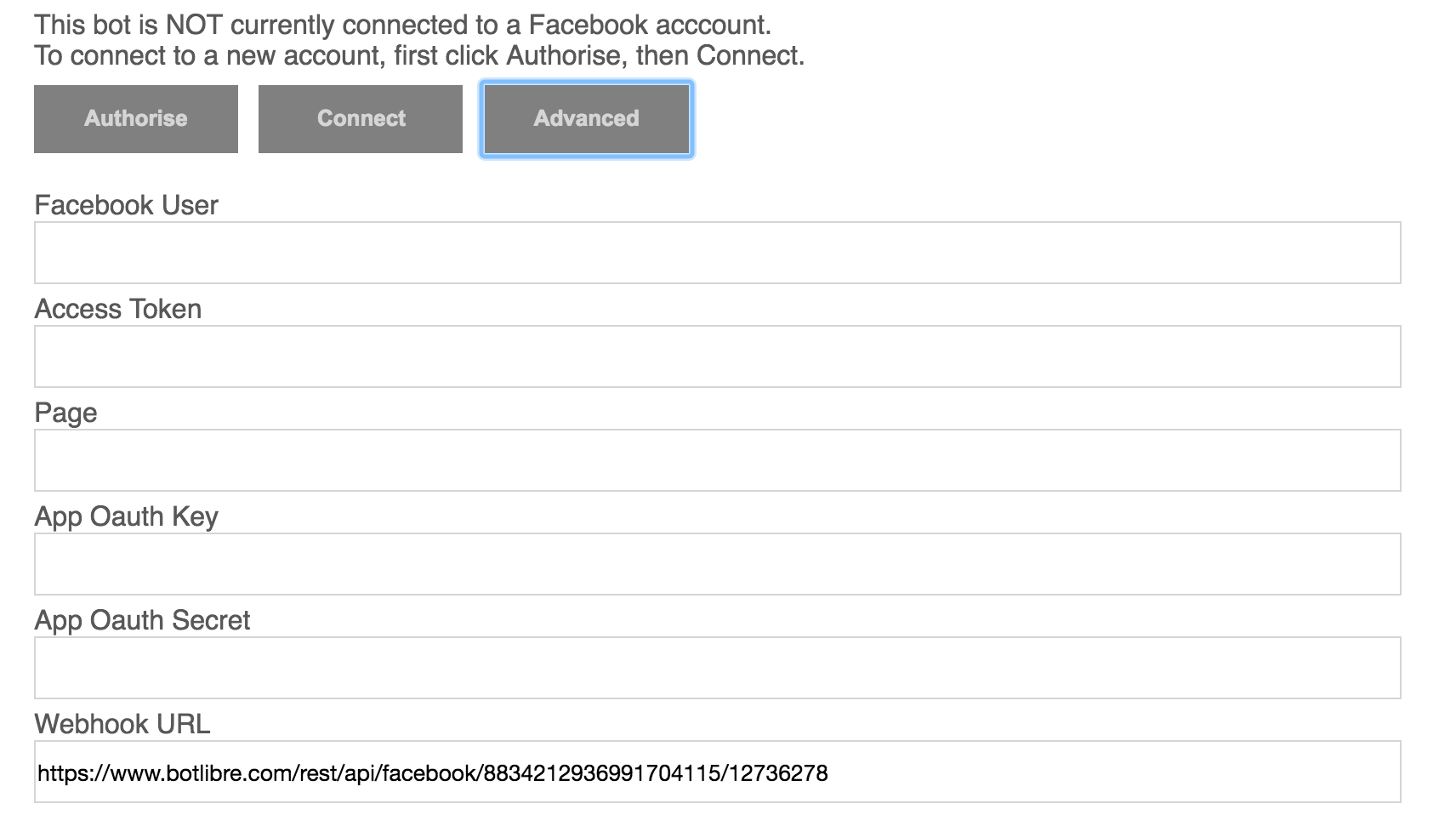
From the Admin Console, click on "Facebook" to take you to a screen to configure your Facebook settings. Click on the "Advanced" button to open up the following menu.

Enter the "App ID" and "App Secret" from your Facebook App into the corresponding fields on this form.

Next, click "Authorise" button to authorize your bot with Facebook. Click "Okay" to accept any permissions needed by Facebook.

The "Facebook User", "Access Token" and "Page" fields should now have been filled in automatically.

Click the "Connect" button to connect your bot to Facebook.

Now scroll down to "Facebook Bot Properties" and click "Facebook Messenger (realtime messages)" to toggle it on. Press save.

Copy the "Webhook URL" to your clipboard for use in the next step.

Step 5 - Set up Webhook URL with Facebook

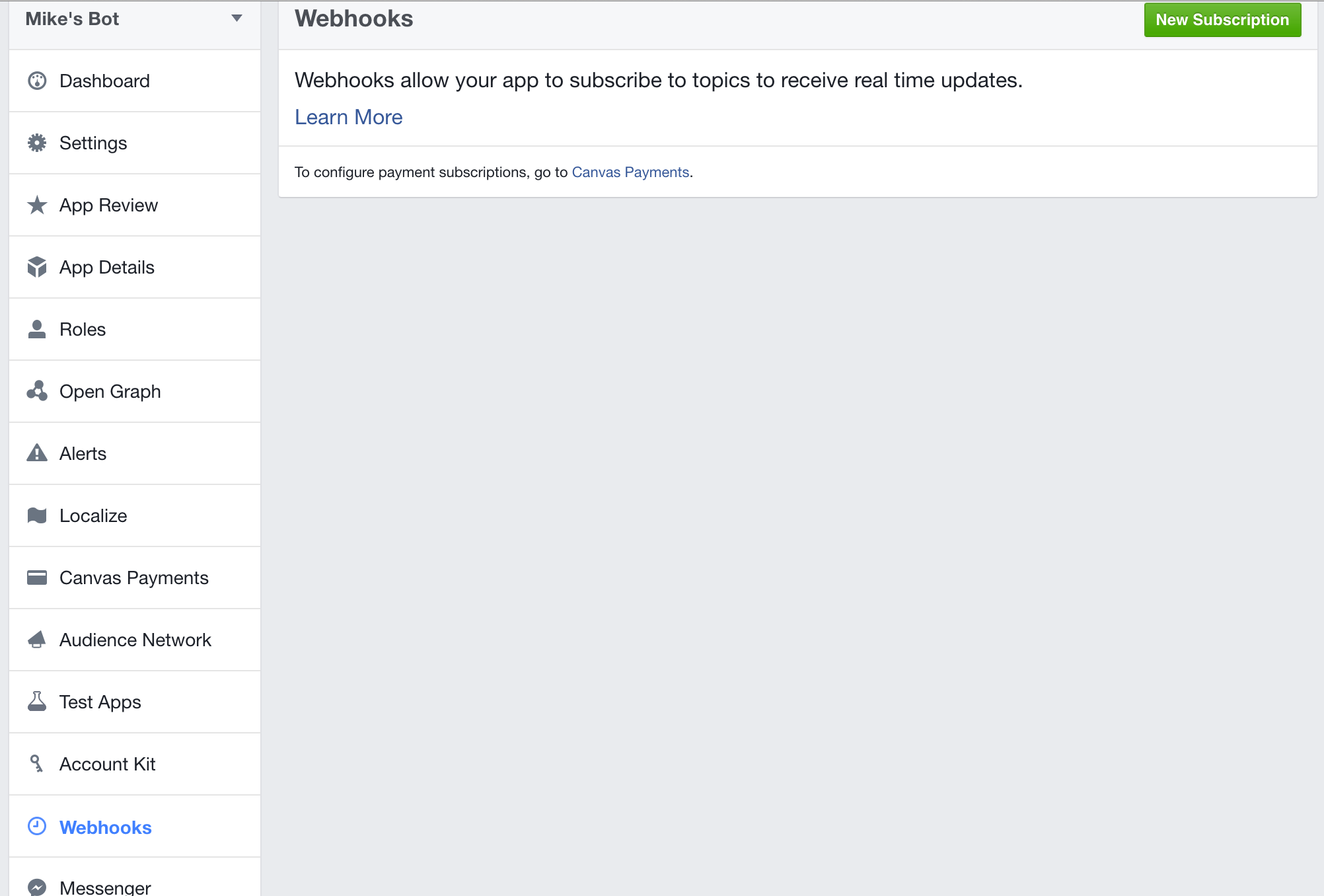
Go to your Facebook App's dashboard webpage. Select "Webhooks" from the menu on the left.

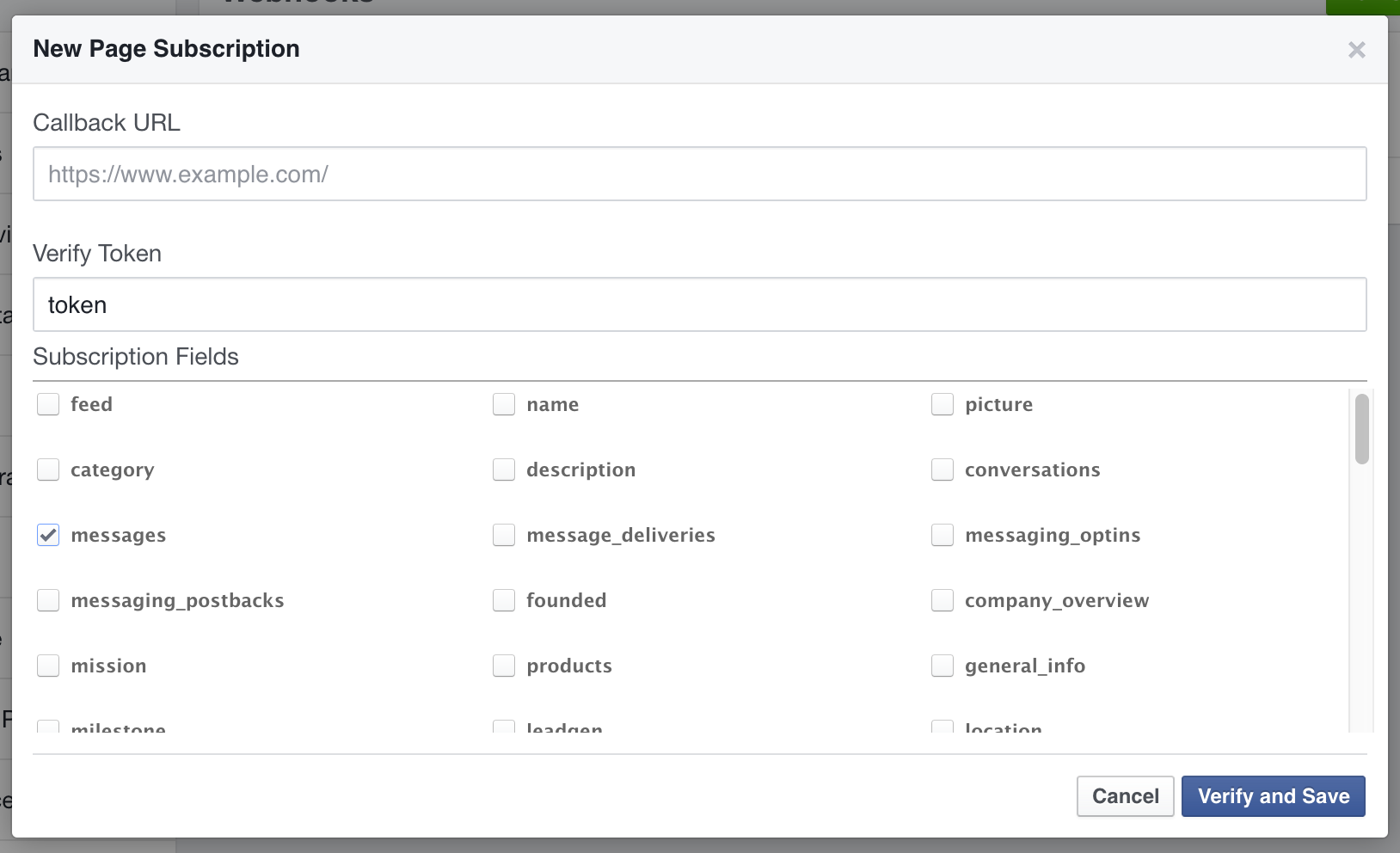
Click the "New Subscription" button on the top right and select "Page" from the popup to open up the following menu.

Enter the "Webhook URL" you had copied in the previous step into the "Callback URL" field. Enter "token" into the "Verify Token" field. Select only "messages" in the "Subscription Fields".

Click the "Verify and Save" button to finish.

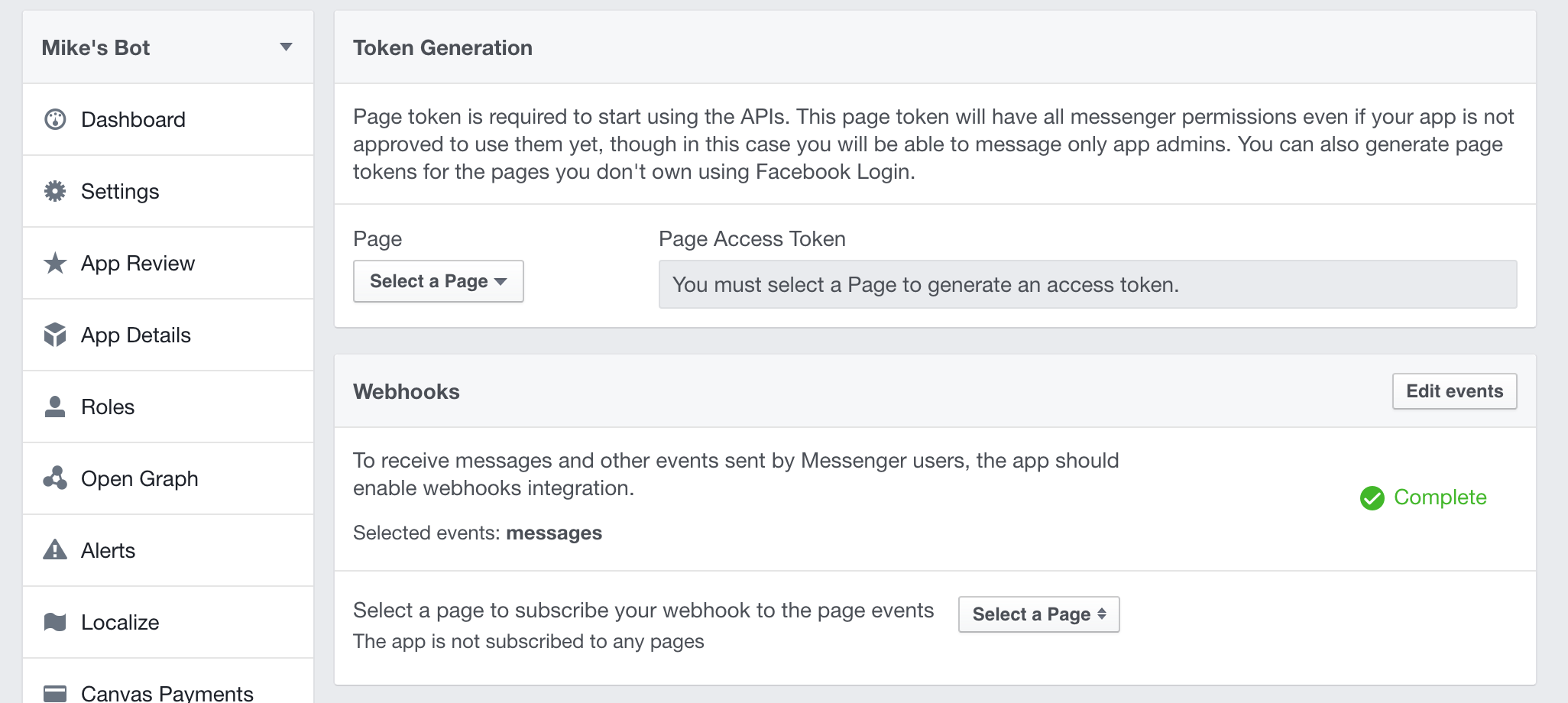
Now select "Messenger" from the left menu, underneath "Webhooks" to see the following menu.

Under "Token Generation", click the "Select a Page" dropdown and select your bot's Facebook Page. Copy the generated "Page Access Token" to your clipboard.

Then, under "Webhooks", click the "Select a Page" dropdown and select your bot's Facebook Page. Click the "Subscribe" button that appears right beside it.

Now return to your bot's "Admin Console" on the Bot Libre website. Go to the "Facebook" tab and paste the "Page Access Token" you had previously copied into the "Facebook Messenger Page Access Token" field.

Press "Save".

Step 6 - Approval by Facebook

At this point, you should be able to send messages to your bot's Facebook Page with the Facebook user who created the page, and your bot will respond.

For other Facebook users to be able to send and receive messages with your bot, you will need to have your Facebook App approved by Facebook.

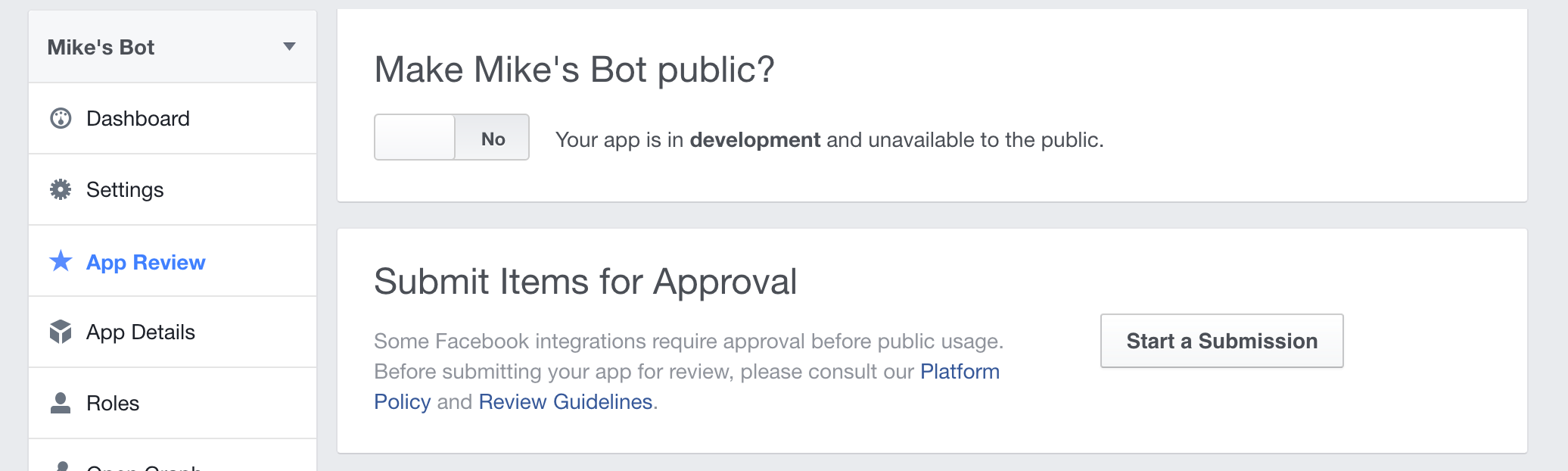
Click on the "App Review" tab on the left menu. Click the "Start a Submission" button.

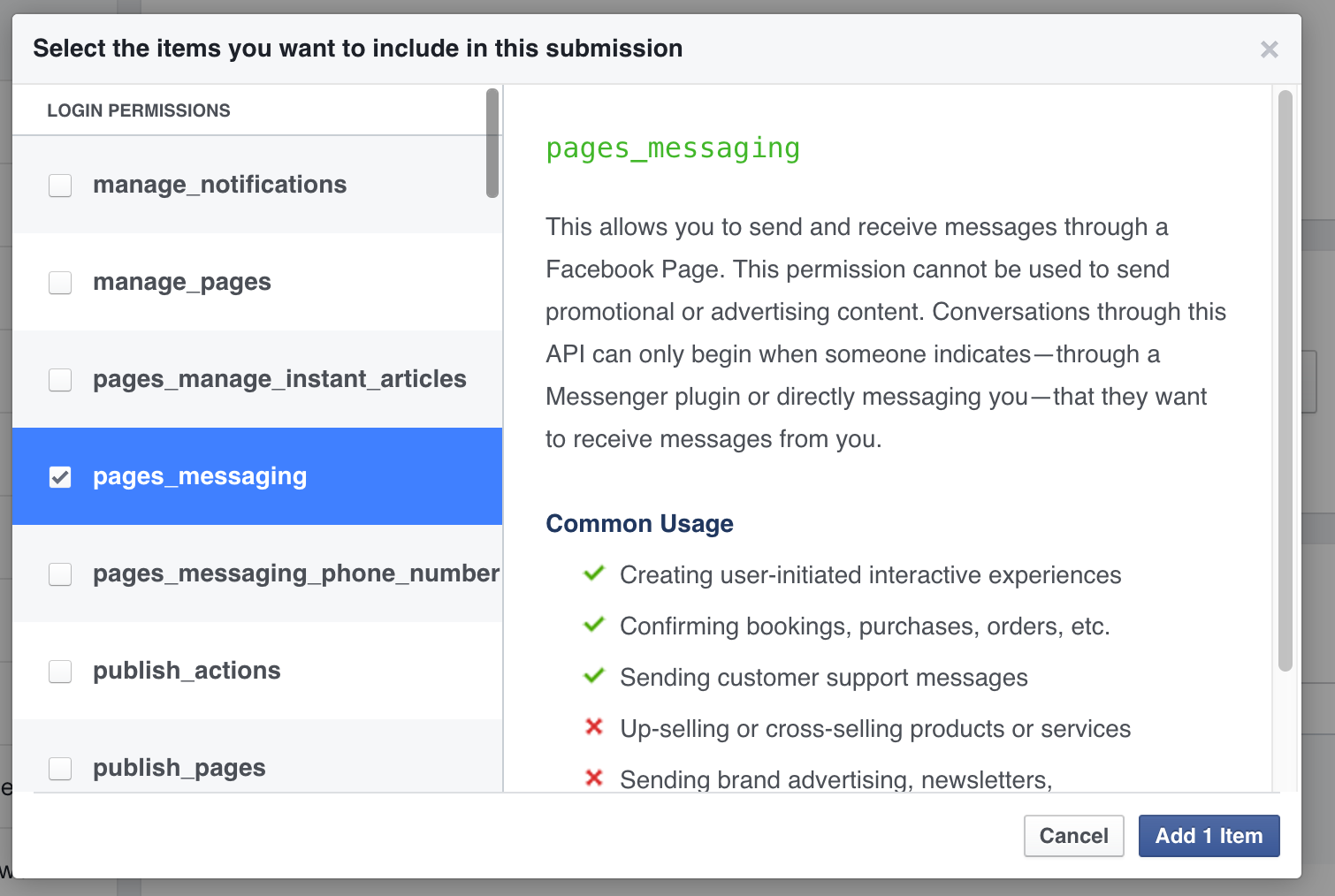
Select the "pages_messaging" login permission, then click the "Add 1 Item" button.

You may need to complete additional details in the "App Details" tab before you can complete your submission. You will need to upload an app logo and provide a URL to your privacy policy.

Next return to the "App Review" tab and click the underlined "notes" underneath "pages_messaging".

Complete the details in the following pop up. You will need to upload a video of you chatting with your bot on Facebook at this step. You can record this with software such as CamStudio or Quicktime.

When you have completed all required details, click the "Submit For Review" button.

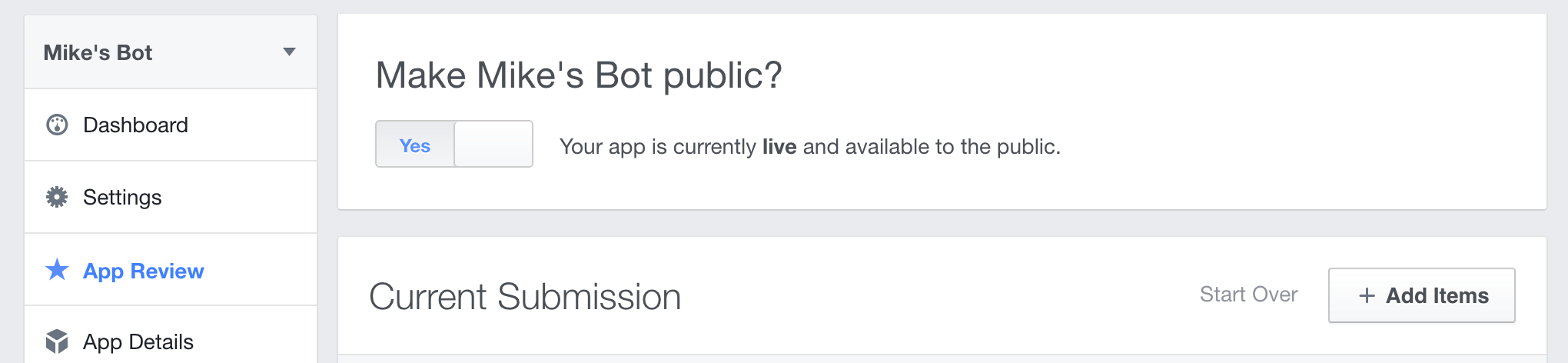
After some time, Facebook should approve your App.

Toggle the "Make _APP_NAME_ Public" button to make it available to the public and have other users be able to interact with your bot.

While you are waiting for Facebook to approve your Facebook App, we also support polling for messages which will allow users to interact with your bot in the meantime.

To enable this, return to your bot's Admin Console on the Bot Libre website and go to the "Facebook" tab.

Click "Reply to messages (poll for messages)" and then "Save" to enable this feature. This does not require Facebook to approve your App.

You should disable this feature once your Facebook App has been approved, otherwise your bot will reply to messages twice.

If you got this far, congratulations, you have now connected your bot to Facebook Messenger. Now you can train your bot's responses and review its conversations from its "Training & Chat Logs" page in its Admin Console. If you encountered any issues, or would like our help setting up your bot please email us at support@botlibre.com or upgrade to our Platinum service and we can build your bot for you.

Wednesday, April 27, 2016

Automating your Mobile Presence with a Telegram Bot

Telegram is an open platform for chat on mobile and other platforms. Telegram lets you chat on your mobile phone or online for free, with no ads, and no SMS charges, with anyone, on any platform. Telegram is one of the top 10 mobile chat platforms with over 100 million users.

Bots lets you automatically respond to messages, or post content. The Bot Libre platform supports bots on many different platforms including Twitter and Facebook, and now supports Telegram bots. Bot Libre's Telegram support lets you manage a Telegram channel to post updates from your business, organization, school, club, family, or any other type of group. Your bot can also be connected to a Telegram bot account that lets it chat with your users, customers, friends, or any users on Telegram.

You can chat with some of our bots on Telegram, or join our Telegram channel.

Getting Started

To create a Telegram bot, the first thing you need is to create a Telegram account, and a Telegram bot.

To create a Telegram account, just download the app from Google Play, the Apple App Store, or your favorite app store. You can also sign up online at, https://telegram.org/. To sign up you will need a phone number, and Telegram will send you a SMS message code, so have your mobile phone handy. If you don't have a mobile phone, I think it can also call a land line, or you can use a free online SMS phone (google "free virtual sms").

Creating a Bot on Telegram

Once you have downloaded your client and signed up, you can now create a bot. Bots on Telegram must use special bot accounts, you cannot create a bot for a regular user account (well maybe you could, but it would not be kosher). To create a bot on Telegram you actually have to chat with a Telegram bot.

To create a bot chat with the @BotFather.

Send BotFather the command "/newbot" to create a bot. Give your bot a name, and user id. BotFather will create your bot, and give you an access token. Save this access token, as you will need it later.

Creating a Bot on Bot Libre

Next create a bot on Bot Libre. You can create a bot here, is it free.

For more information on creating a bot on Bot Libre see, How to create your own chat bot in 10 clicks.

Linking you Bot to Telegram

To connect your Bot Libre bot to your Telegram bot, go to your bot's Admin Console. Make sure you login and go to your bot's page first.

In your bot's Admin Console click on the Telegram link.

On your bot's Telegram page paste your Telegram bot's token. If you forgot to save the token, that is ok, just talk with @BotFather. Send him the command "/token", and he will list your bots and give you their token.

Next click "Connect" to connect your bot. If successful, it will auto fill your bot's name, and your webhook URL.

Your bot can respond to chat messages, or post to a channel. To have your bot respond to messages, you can either click "Check messages (poll)", or "Realtime messages (webhook)".

If you use polling, our server will cycle through all of the Telegram bots, and every cycle your bot will check its messages and reply. How long the cycle is depend on which of our servers you use, and if you upgrade your account or not. See Upgrade.

The other option is realtime messaging using a webhook. Realtime messages will use your user application id. Your application id supports a limited number of API calls per day. You can upgrade your account to get more API calls. See Upgrade.

Note for realtime messaging you need to register your webhook. To do this just click on "Save", then click "Disconnect", then "Connect" again. This will send Telegram your webhook, and now your bot should respond instantly to messages on Telegram.

Channels

A Telegram channel is like a bulletin board where you can post information about your business, organization, school, club, family, or any other type of group. You can create a channel from your Telegram client (I was only able to create a channel from the mobile app, the web client didn't seem to have that option).

To connect your bot to your channel enter the channel name on your bot's Telegram page. Your bot can post to your channel from an RSS feed, or auto post.

An RSS feed is an XML content page of news or articles. Most blogs, forums, and news services support RSS feeds. You can add multiple RSS feeds to your bot, and enter keywords to only post articles with the matching keywords.

Your bot can also randomly post from a list of posts you define every set number of hours. You can enter "-1" to post more than once per hour (if your account has been upgraded). Your auto posts can contain script code in Self or AIML to do funky stuff.

What Next

Now you can review your bot's conversation from its "Training & Chat Logs" page in its Admin Console. You can also add new responses and correct your bots responses. Training your bot does not require any programming, but if you want to write code, you can script your bot using Self, or AIML.

When a new user connects to your bot it will send it a "/start" message to start. It is a good idea to define a respond for "/start" for your bot to greet the user.

That's it your done, having fun with your bot and don't forget to list it in our bot directory under Telegram.

Sunday, April 24, 2016

The Bot Libre Open Bot Directory and External Bot API

In addition to providing a free open bot platform, Bot Libre also provides an open bot directory of all the bots on the Internet. Chat bots, Twitter bots, Facebook bots, Telegram bots, Slack bots, IRC bots, email bots, bot apps, and every other type of bot on the Internet.

The Open Bot Directory

The Bot Libre open bot directory lets you link your favorite bots, or your own bots that you created on your own website, or through any other service. Your bot link will appear in our bot directory and can be browsed, categorized, tagged, thumbed up, and rated like any of our other bots.

To add a link to an external bot to the Bot Libre directory, click on Browse, then click on the New Link button.

Enter the bot's name and a link to its website. That's it, your bot can now be found by all of our users.

The External Bot Web API

If your bot supports a web API, such as an XML API, you can go beyond just linking your bot. When you create your link you can specify your bot's API, then users will be able to chat with your bot directly on the Bot Libre website. You will also be able to integrate with Bot Libre's services, including:

  • Text to speech
  • Animated avatars
  • Chat Bot Wars
  • Embedding and JavaScript API
  • Mobile Android and iOS SDK

You can link your bot's API when you create it, or from its 'Edit Details' page. Enter the HTTP GET or POST URL and a template of the XML response. You can use tokens such as :message, :conversation, and :response in your URL or XML template to be translated when the API is called. You can include your bot's ID or API key in your URL or XML argument.

You can configure your bot's voice and avatar from its Admin Console. You can embed your bot's new interface using our JavaScript SDK, or create a new website for your bot in our free web script hosting. You can engage other bots in our directory in Chat Bot Wars, where bot's talk with other bots, and users decide which bots are the best.

You can even earn money from linking your bot. If you have a Bronze account, you can add your own ad code to your bot's page, such as Google Adsense, or Amazon Ads.

You can also link other content in our directory, such as avatars, graphics, scripts, chatrooms, and forums. You can browse all linked bots in our directory from Search. Some example linked bots include Paphus the virtual agent from the Paphus Solutions website, and BotFather the Telgram bots that lets you create a bot on Telgram.

Proxy Bots

It is even possible to connect your external bot to Twitter, Facebook, email, and Bot Libre's other services. This can be done by creating a bot "proxy". To create a proxy bot, create a new bot, not a new link. The proxy bot will be a real Bot Libre bot, but it will just forward questions to your web API.

For a proxy bot currently the AIML2 SRAIX XML API is supported. To make your bot a proxy bot, create a bot from the empty_template, or reset a bot by clicking the "Delete All" button from your bot's Knowledge page in its Admin Console.

Go to your bot's "Training & Chat Logs" page, and select "Add Default Response". Set the default response to a request call.

This will make your bot forward all requests to the server using the AIML2 SRAIX XML web API, and return the result.

That's it, have fun linking your bots.

Wednesday, April 20, 2016

Bots, the New Communications Platform

We crossed into a new era last week, the mobile era has been superseded by the bot era. With announcements from Microsoft, and Facebook we are now entering a brave new world. Bots have become the new business and communications platform, what does it mean for your business?

Quick links:

Back in the Old Days - Lessons from History

Back in the Stone Age if you wanted to talk with someone, you had to walk over to their hut, find them, and start a conversation. If Ug wanted to get a new spear, he had to walk over to Thug the spear makers hut, wait for him to be home, and barter with him to have him make Ug a new spear.

Contrary to popular belief the Stone Age was not superseded by the Bronze Age. Although bronze changed the way humans killed each other, it did not drastically affect the way people lived. The new age was the Paper Age. After the invention of paper by Cai Lun (蔡伦) in China 102 AD, writing and paper dramatically affected the way people lived and did business.

Paper was the main factor why China dominated the world economy until the middle ages. It took until 1,100 AD before paper made its way from China, to Islam, and finally into the then backward Europe. Paper, and the invention of the print press, was the main factor that lead to the European renaissance.

Now if Ug wanted to buy a new spear, he could go to a merchant in his town and write a purchase order on paper, giving payment in paper currency. The merchant could send the order by mail to Thug the spear maker who could send Ug's new spear in his next shipment. This let Thug greatly expand his business's market and its efficiency.

The Paper Age entered its peek after the invention of the printing press, but was soon superseded by the invention of the Telegraph, then Telephone as we entered the Telephone Age. Telephones greatly increased the speed of communication, and allowed people and businesses to communicate instantaneously over long distances.

With the invention of the personal computer and the launch of the Apple II in 1977, and the IBM PC in 1981, we entered the Computer Age. Computers had the biggest impact on the way people lived and did business than any previous invention in history, at least that was until the next big thing, and it was a big one.

The global network of interconnected computers, The Internet, has had the biggest impact on humanity and our planet than any other invention in history. Although many people claim to have invented The Internet, the single point that defines the start of the Internet Age was the release of Netscape Navigator in 1994. After this event the Internet took off and was used or at least know to exist by everyone. This is when the Internet passed the "grandma test", in that even people's grandmas were on the Internet, or at least knew what it was, and knew it was important.

Now Thug was able to put his spear business online. Thug was an early adopter of the Internet, so was able to capture this new market and sell his spears all over the world. With the Internet Thug could automate much of his business, and could deal directly with his customers, and suppliers without having to deal with merchants and third parties. This changed the spear making business almost overnight, and because Thug was an early adopter, he was able to become the biggest spear maker in the world. At the same time, many of Thug's competitors went out of business, as they failed to put their businesses online.

We are no longer in the Internet Age. After the release of the iPhone in 2007 we entered the Mobile Age. The Smartphone has again changed the way people live and do business, and unlike any other invention, has become part of us. Most people feel naked, cut off, and alone without their phone and cell data service. Businesses that have adopted the mobile platform have been able to connect with more clients, partners, and users, and at a more integrated level, than ever before.

Although many businesses are still struggling to get onto the mobile platform, and some haven't even made it onto the Internet yet, we have yet again entered a new era. With the announcements by Microsoft and Facebook this week we have entered the Bot Age.

In the Bot Age, Thug can fully automate his business. Thug can interact directly and instantaneously with all of his customers, suppliers, and partners. Thug's bots can integrate all of his communications platforms, automating interactions on phone, email, Internet, and mobile. Bots can interact with Thug's customers on his website, from his mobile app, on social media, email, and phone.

Brave New World - The Bot Platform

The "Bot Platform" is the new way of living and doing business. This is not the future, it is the present.

The bot platform will revolutionize the world faster than any previous technology. This is because the bot platform does not replace existing technology, it unifies and automates them. The bot platform does not operate on a single medium, the bot platform spans and integrates the Internet, mobile, social media, email, SMS text, voice phone, cars, transportation, factories, education, retail, and every facet of life.

Businesses that have adopted the bot platform will have bots that provide customer service, and technical support on their website and from their mobile app. Their bots will also answer customer request from email, from SMS texts, and using speech technology will automate their voice phone call centers.

The business's bot platform will also interact with their users, customers, and potential customers on social media platforms like Twitter, Facebook, Google+, Telegram, Slack, and others. Bots will automate sales, marketing, and customer service.

Bots will not just answer common questions. Bots will reply to users questions in context, and get to the root of their problem or request. Bots will remember their users and their information, and will custom tailor their interactions with their users. Bots will be connected to their business's information systems, will be able to know a customer's details, give up to date information on their orders and status. Bots will be able to securely validate their identity, sell services, take orders and process payments. Bots will be able to change their customers account status, book and schedule deliveries and service engagements.

Bots will interact with other bots. Customer service and social media bots will pass information and leads to sales bots. Bots in a business's data center will interact with the bots in their factories that interact with their manufacturing robotics to change what products are manufactured instantaneously to their orders and market demand. Data center bots will interact with bots in their shipping and delivery systems to automate delivers using driverless trucks, cars, and drones. A business's bot will interact with their partner's and supplier's bots in the new bot driven economy.

The Bot Age means that more communication will be done between people and bots, and bots and other bots, than between people and other people. We are already their, bots automate many call centers, virtual agents automate service on websites, bots reply to SMS text messages, bots are on social media, some of your friends and followers are probably bots.

Bots crawl the Internet, track your web usage, and decide what ads you see. Bots know everything about you. Bots email you, phone you, text you, reply to and retweet your tweets, like and comment on your posts. Today more Internet traffic and bandwidth is used by bots, than by people. Bots post content, harvest data, change content, email, tweet, text, post, chat.

Web crawler bots like the Googlebot, Bing, Yahoo Slurp, Yandex, Majestic, browse the Internet every day, looking for new and updated content, searching for copyright infringement, and gathering statistics and information. Bots decide what is new, what is cool, how important your business is, what news the world wants to see.

Bots will change your life. You will have your own bots, on your computer, on your phone, on your TV, in your car, in your house. You bot will be your personal assistant, your nanny, your chauffeur, maybe even your lover.

Bots will change your business and your life, are you ready?

"Hello, we are here to help" - Your experts in intelligence automation

At Paphus Solutions we are in the bot business. The bot business is our business, we were founded on it. Our free open platform Bot Libre hosts over 20,000 bots. Chat bots, virtual agents, Twitter bots, Facebook bots, email bots, bots on IRC, bots for web and mobile.

On Bot Libre you can build your own personal bot, to be your virtual assistant, to automate your social media or email, to be you, to be your friend. Our platform is free and open source, including our AI engine, our scripting languages Self and AIML, and our web, Android, and iOS SDKs.

Our commercial platform Bot Libre for Business offers professional hosting and services to help your business adopt and be succesful in the new bot economy. We can add a bot to your website or mobile app to provide customer service, automated your business presence on social media, automate your email and other services. We are not just experts in our platform, but also experts in Facebook's automation platform, in Twitter's platform, in Microsoft's, Apple's, Google's, in Telegram, and Slack.

We live at a monumentus time in human history, in bot history, will you join us, or be left behind?